# Angular Entry Components - Explained
Hello awesome people👋, welcome back.
In this post, I am going to deep dive into Entry components in Angular.
## What is the entry component? 🤔
As you may know, the entry component is a component that is dynamically loaded into view. A set of components can be listed in the `@NgModule.entryComponents` property, that is compiled and readily available for rendering within the Module.
> Entry components have been deprecated with the introduction of the Ivy rendering engine. We no longer needed to specify entry components in `@NgModule` since Ivy just takes care of them.
You still need to have `entryComponents` property in `@NgModule` if your components are going to be consumed by a View Engine application rather than HTML.
## What are the types of Entry components?
1. Bootstrapped root component
2. A component specified in the Router configuration
### Bootstrapped root component
A component that is specified in the `bootstrap` array in the `NgModule` decorator (of AppModule) is a bootstrap component, that gets loaded into DOM when the app is accessed.
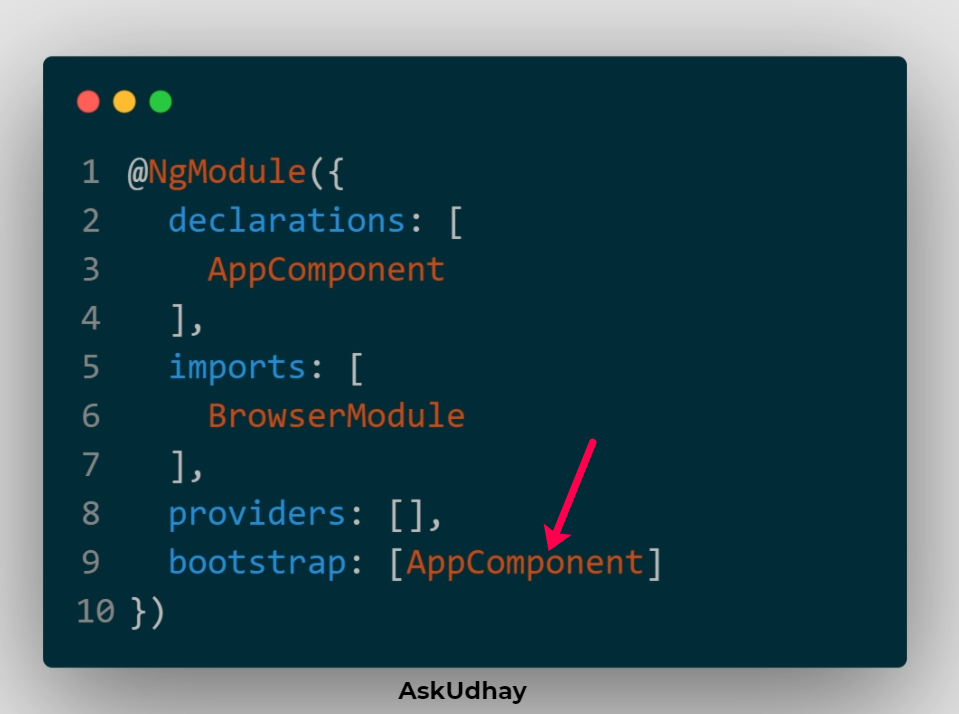
We can have more than one bootstrap component, I explained that further down below.
### A component specified in the Router configuration
This is the second type of Entry component specified in the Router configuration.
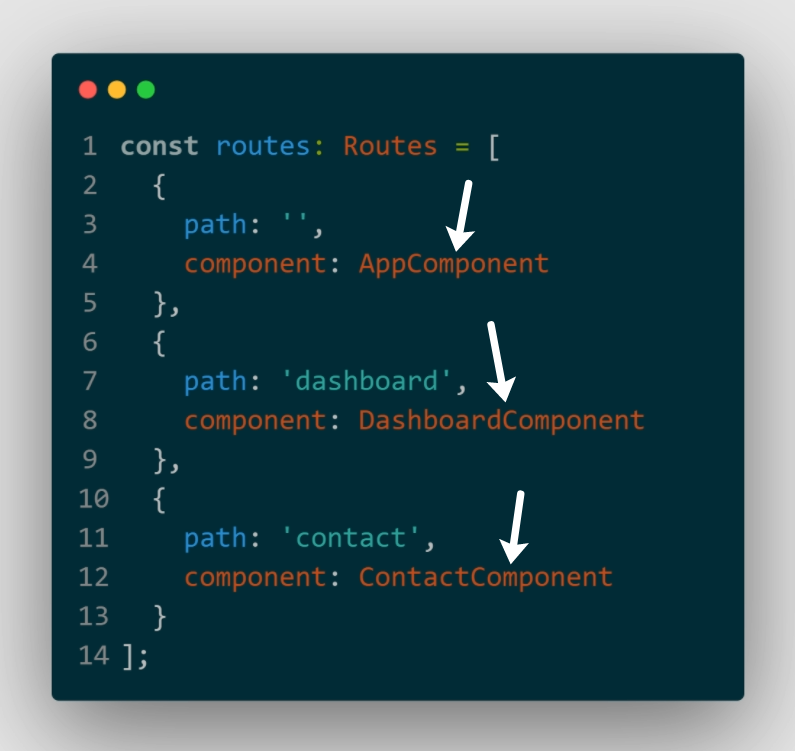
All the router components specified in the router configuration are entry components.
Even though we don't specify all these components in the `entryComponents` array in `NgModule`, the compiler just adds them to the array.
Smart, isn't it?
### Can I have more than one component in the bootstrap array in NgModule? 😕
Oh yes, you can. 👍
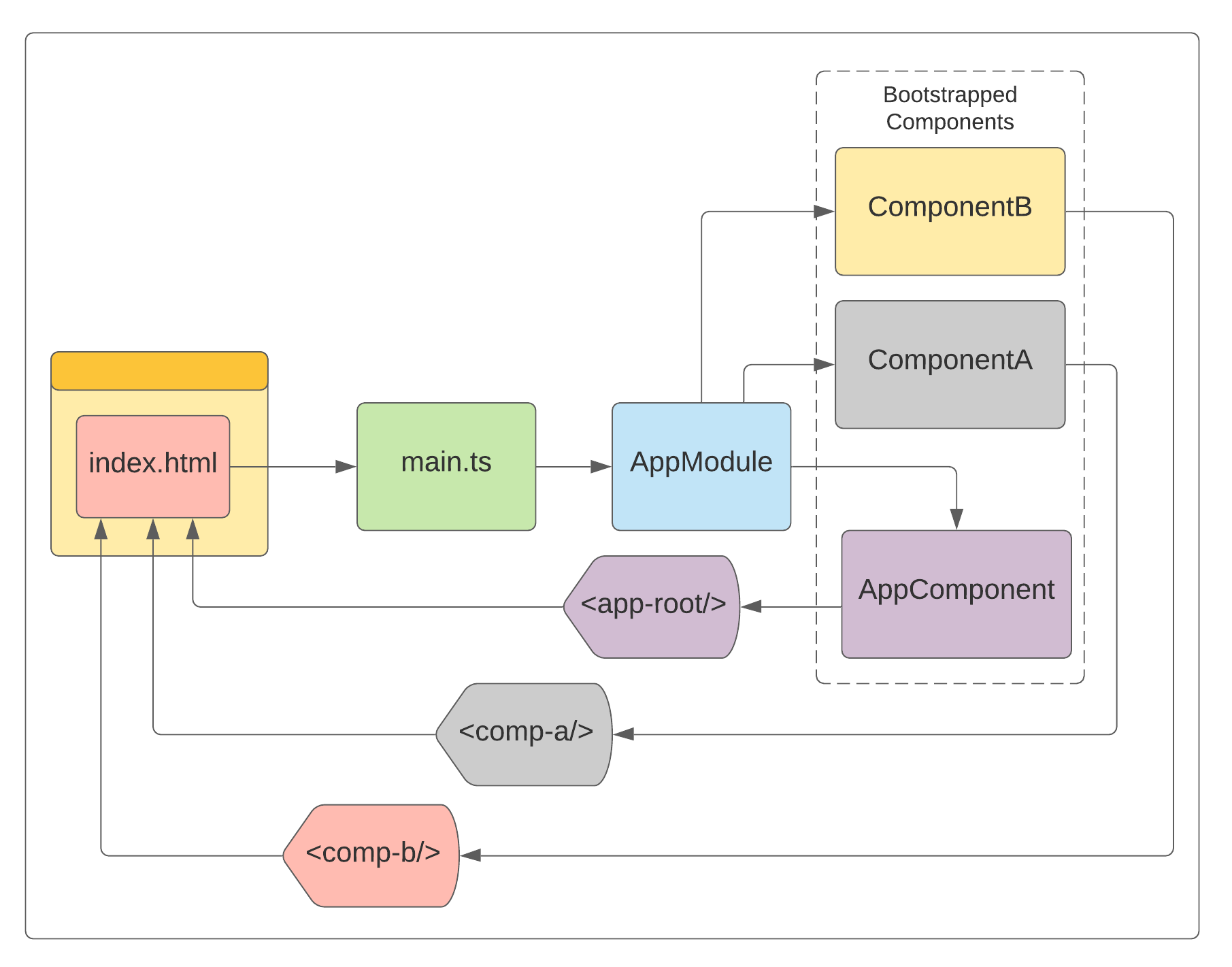
Assume your `index.html` has three components as shown below:
```
```
These three components need to be bootstrapped and must be listed in the `bootstrap` array in the `NgModule` decorator of AppModule.
```
@NgModule({
declarations: [
AppComponent,
ComponentA,
ComponentB
],
imports: [
BrowserModule
],
providers: [],
bootstrap: [AppComponent, ComponentA, ComponentB]
})
```
Just explained the bootstrap process here:
1. When an Angular app loads, the `index.html` gets loaded first which calls `main.ts`.
2. The `main.ts` bootstraps 'AppModule`.
3. Components listed in the `bootstrap` array in `AppModule` get bootstrapped.
4. Finally all three components are loaded into DOM.
## Dig into the main.ts from the final build
Build your Angular app using the command `ng build`.
Search for `bootstrap:[` in main.ts in the final build, you will see the list of bootstrap components in the `bootstrap` array.
They don't have the same components name as you have in the code, they will be with random characters.
Like this: `bootstrap:[Ll,Zl,zl]`
Further search for `LI`, `Zl`, and `zl` (case sensitive search), will fetch you the components' Selectors:
```
.
.
let Ll=(()=>{class t{constructor()
{this.title="Hello World"}}return t.\u0275fac=function(e)
{return new(e||t)},t.\u0275cmp=Mt({type:t,selectors:[["app-root"]],
.
.
Zl=(()=>{class t{constructor(){}ngOnInit(){}}
return t.\u0275fac=function(e){
return new(e||t)},t.\u0275cmp=Mt({type:t,selectors:[["comp-a"]],
.
.
zl=(()=>{class t{constructor(){}ngOnInit(){}}
return t.\u0275fac=function(e){
return new(e||t)},t.\u0275cmp=Mt({type:t,selectors:[["comp-b"]]
```
## Entrycomponents and Compiler
* Adding as many components in the `@NgModule.declarations` will not get loaded into the final build.
* The angular compiler is smart enough, components that are listed in the `bootstrap` array *[1]* (or) the components that are used in the template *[2]* (or) the router components *[3]* will only go into the final build.
* The tree shaker will throw away the components that don't fall under one of the categories listed above.
Hope you find this article useful, please feel free to share it with your friends/colleagues.
If you got any questions, feel free to post them in the comments section down below.
Happy learning!
I tweet a lot about Web development, Java, and Productivity Hacks, so feel free to follow me on Twitter at [AskUdhay](https://twitter.com/AskUdhay).
Here is one of my recent tweets:
%[https://twitter.com/AskUdhay/status/1408415572488974338]
## References:
https://angular.io/guide/entry-components