How to use Template Reference Variable in Parent-Child components interaction?
Let the Parent component talk to the Child component :)

Writing this blog post right away after implementing this concept in one of my projects. I like documenting my findings as a blog post as it stays here as a reference guide.
Okay, I was trying to invoke methods present in the child component from the parent component so I decided to use the template reference variable.
It was really cool.
Template variables help you use data from one part of a template in another part of the template.
Let's get started.
Create a new Angular project
Let's first create an Angular project.
ng new parent-child-template-ref-var
Create a Child component
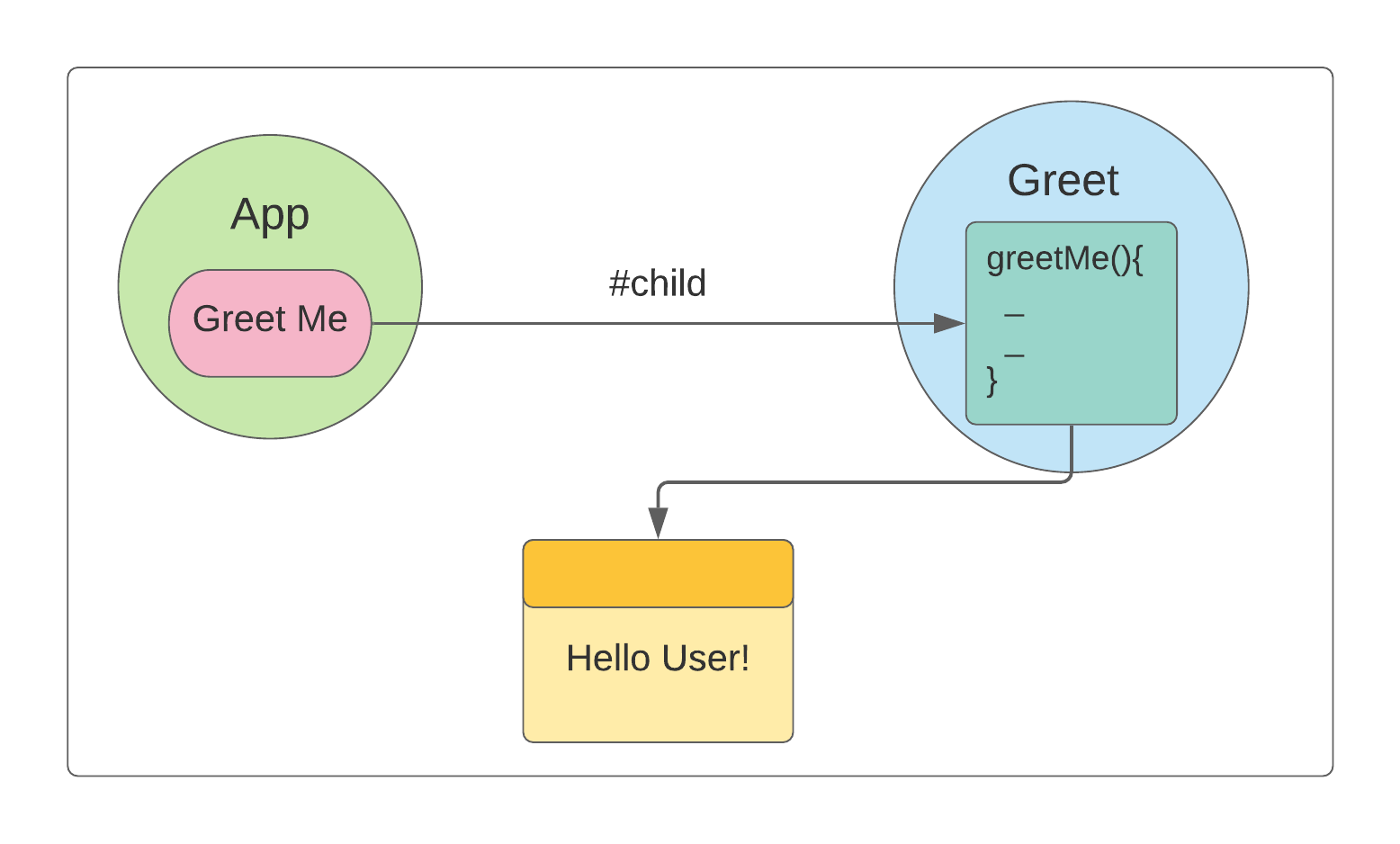
Go ahead and create a child component called Greet, and add a method called greetMe() to greet Users.
ng g c greet
greet.component.ts
import { Component, OnInit } from '@angular/core';

@Component({
  selector: 'app-greet',
  templateUrl: './greet.component.html',
  styleUrls: ['./greet.component.css']
})
export class GreetComponent implements OnInit {

  displayTxt: boolean = false;

  constructor() { }

  ngOnInit(): void {
  }

  greetMe(){
    this.displayTxt = true;
  }
}
greet.component.html
<div *ngIf="displayTxt">
    Hello User!
</div>
When the displayTxt boolean property is true, the text Hello User! is displayed. And this can be done by invoking the method greetMe() as it sets the value true to the property.
Invoke the method greetMe() from Parent component
Look at the #child template reference variable. It does the magic here, has access to all the methods and properties of the greet child component.
<app-greet #child>
</app-greet>
<button (click)="child.greetMe()">
   Greet Me
</button>
Putting altogether
Live Demo
Take me to Live Demo
Source code
If you got any questions, feel free to post them in the comments section down below.
Happy learning!
I tweet a lot about Web development, Java, and Productivity Hacks, so feel free to follow me on Twitter at AskUdhay.
Here is one of my recent tweets:
Reference
About the author
• Full Stack Engineer • Auth0Ambassador • Organizer at AngularHive community • Speaker • Blogger
Comments
Join the discussionThis is a good article Udhay. I'm always afraid of accessing template references this way to child components. Not for any particular reason. Do you think this will be problematic in any case?
I missed your comment somehow. Sorry about that.
I don't think so it is problematic when we use template reference as long as we care about what can be exposed in Component class.